


In spare parts distribution, a dealer’s order is usually long and urgent: a vehicle is waiting in the workshop, and the part has to ship the same day. In a warehouse like that, one wrong part costs more than a second shipment; it costs a customer’s trust. This article looks at what makes a spare parts warehouse hard to run and how to keep every step under control with locations and barcode scanning.
What makes a spare parts warehouse hard to run?
A spare parts warehouse differs from an ordinary one in a few ways:
- There are a huge number of part numbers. Thousands, often tens of thousands, of different parts share one warehouse, and many sell only a few times a month.
- Parts look alike. The left and right versions of the same part, brake pads for two different engines or two bearings may be impossible to tell apart by eye.
- There are equivalents. Parts from different brands that do the same job carry different part numbers, and side by side on a shelf they’re easy to mix up.
- Orders have many lines and small quantities. One dealer order can hold dozens of different parts, a few of each.
- Returns are frequent. Parts ordered by mistake or that don’t fit the vehicle come back, and they need to go back to the right shelf.
That’s why mistakes in a spare parts warehouse tend to come from the same places:
| Mistake | Usual cause | Prevention |
|---|---|---|
| Wrong part shipped | Look-alike parts, equivalent part numbers | Scanning every item at the shipment check |
| Short quantity | Small parts counted by eye | Ordered and picked quantities side by side on the handheld |
| Part can’t be found | Only a few people know where it is | A location for every part in the system |
| Returns go missing or to the wrong shelf | Returns waiting in an unrecorded corner | Receiving and putting away returns by scanning, like any other delivery |
| Counts don’t match the ERP | Moves that were never recorded | Every move recorded with a scan; counts location by location |
A location for every part
An organized spare parts warehouse starts with locations. You define the warehouse with location codes made of parts such as aisle, rack, level and bin: A-03-02-1, for example, is aisle A, rack 3, level 2, bin 1. Stock for every part is kept by location, so the answer to “Where is this part?” lives in the system, not in someone’s head.
A few practical tips:
- Print location labels in bulk. Every bin needs a scannable label, so pickers confirm the location with a scan, not by eye.
- Give fast movers fixed locations. Put best-selling brake pads, filters or bearings in fixed locations close to the picking area, and keep reserve stock on upper levels or back racks.
- Keep look-alikes apart. Not placing left and right parts, equivalents or part numbers that differ by a single character in neighboring bins cuts picking errors from the start.
- Label parts that have no barcode. Some parts arrive without a barcode or with only the supplier’s label. Printing your own item labels means every part can be scanned.
Receiving and returns: right the first time
Most mistakes start at the door. If parts are received by scanning them one by one when the supplier’s box is opened, short and over deliveries show up immediately, and an unknown barcode or an item that isn’t on the delivery note triggers an alert.
Where the received part goes matters too. A good put-away rule is the part’s fixed location first, then locations that already hold it, so the same part doesn’t get scattered across the warehouse. When a dealer order is waiting for the part, it can also skip the shelf and go straight to the area where that order is prepared. In spare parts, that’s the fastest way to clear backorders.
Returns should come in through the same door. A return delivery note is handled like any other receiving job: the part is scanned, checked and put away in the right location. An unrecorded “returns corner” is one of the most common causes of count differences in a spare parts warehouse.
Picking and shipment checks: no scan, no next step
With long dealer orders, the number of trips a picker makes through the warehouse decides how long the work takes. Orders turn into work orders based on your shipping calendar and cut-off times; several orders can be combined into one work order, and the picker works from a single list sorted by location.
Every location and every part is scanned during picking. There’s no moving on until the right location is scanned and it holds enough stock. If the wrong part is scanned, say the equivalent sitting next to the ordered part, the handheld flags it at once.
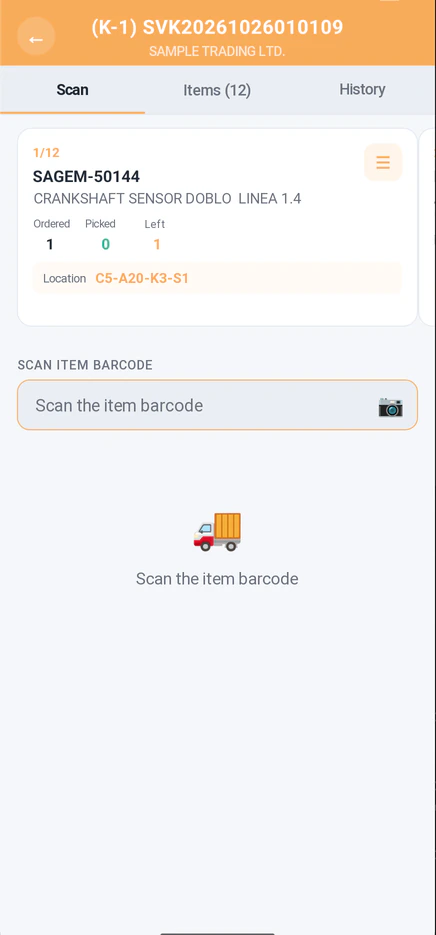
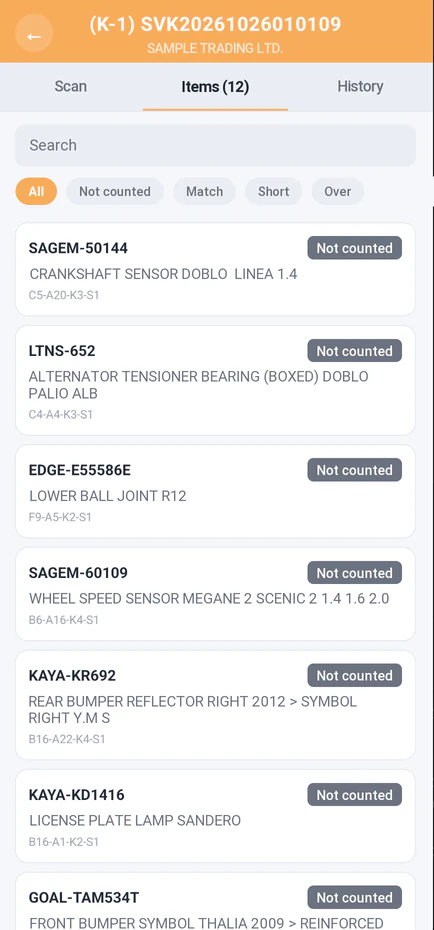
The last safety net is the shipment check. Before a box is closed, every part on the order is scanned once more, so a wrong item or a short quantity is caught while the box is still open. Boxes, weights and labels are handled on the same screen. For your dealer, it’s simple: the part they ordered arrives, in the quantity they ordered.
Counts and slow-moving stock
With so many part numbers, counting a spare parts warehouse is heavy work. Counting location by location with a handheld makes it faster and more accurate: in the first count, the counter never sees the expected quantity, only whether the result matches, is short or is over. Locations that came out different can be assigned to other counters and are recounted until the difference is zero; the whole warehouse isn’t counted again.
Counts have a less obvious benefit too: they surface slow-moving stock. Some part numbers sit on the shelf for years, tying up cash and space. Reports on stock by location and slow-moving stock show which parts take up room and which should move to a better location.
Branch warehouses and replenishment
For distributors with regional warehouses or branches, having the right part at the right branch drives sales directly. Transfers between warehouses should go through the same picking and receiving flow: picked and shipped at the source, received by scanning at the destination. Replenishment suggestions work out how much of each part to send to each branch based on shipped quantities, current stock and safety stock, and turn into transfer plans.
The same goes for sets and kits. Sets made up of several parts are assembled with kit assembly work orders and broken down again with kit disassembly work orders when needed, and kit contents can be uploaded from Excel.
Where to start
You don’t have to change the warehouse overnight. To get a spare parts warehouse in order, in this sequence:
- Set up your locations Decide on your aisle, rack, level and bin layout, prepare the location list and print the labels.
- Assign fixed locations Put fast movers in fixed locations close to the picking area.
- Label parts without barcodes Make sure every part can be scanned.
- Run an initial count Count every location with a handheld, compare counted and ERP quantities, and approve to create your location stock.
- Scan every move From receiving to shipping, including returns and transfers, nothing moves without a scan.
Running spare parts on Buyasoft
Buyasoft WMS runs every step in this article on handhelds, by barcode: locations and layout, receiving with put-away suggestions, picking in location order, shipment checks, counts, transfers, replenishment and kit work orders. Orders, products, barcodes and delivery notes come from your ERP, and shipping documents and warehouse and transfer postings flow back to it.
If your dealers order through Buyasoft B2B, they find parts by product code, OEM number, equivalent or competitor code and see stock warehouse by warehouse; see our automotive spare parts page for details. Your field reps and sales team work on the same platform with Buyasoft CRM. The more accurate your warehouse records, the more reliable the stock your dealers see in the portal, and the more surely the part they order ships right and on time.
Frequently asked questions
How do we handle parts that have no barcode?
You print item labels on your warehouse label printers, and location labels are printed in bulk. A part that arrives without a barcode can then be scanned and tracked from the moment it enters the warehouse.
Won’t equivalent parts get mixed up?
Each equivalent has its own part number and barcode. If the part scanned during picking or the shipment check isn’t the one on the order, the handheld flags it at once, so the wrong part is caught before it goes in the box.
We have several warehouses and branches. Can we manage them in one system?
Yes. Warehouses, storage areas and locations are set up separately; transfers between warehouses run on transfer plans, and branch needs on replenishment suggestions.
Which devices can we use as handhelds?
The Buyasoft WMS handheld app runs on Android devices, and item and location barcodes are scanned with the device’s scanner. Some tasks, such as shipment checks and bulk receiving and put-away, can also be done on web screens.
In short: mistakes in a spare parts warehouse come from look-alike parts and unrecorded moves. Give every part a location and confirm every move with a scan, and the right part reaches your dealer in the right box.
Let’s talk about your warehouse and your part numbering, and we’ll prepare a demo tailored to your warehouse layout and your ERP.
Request a free demoor call us at +90 216 277 70 80.