Today
Orders arrive by phone, WhatsApp and email, and your team spends the day keying them in.
With Buyasoft B2B
Dealers place orders in the portal themselves; each order is checked and sent to your ERP.

Your dealers order online, your sales team follows every customer on one screen and your warehouse runs without errors, all integrated with your ERP on one platform.
Request a free demo

Each dealer sees their own prices, stock and balance, and places orders themselves. Orders pass your credit and margin checks before reaching your ERP, so your sales team can sell instead of taking phone orders.
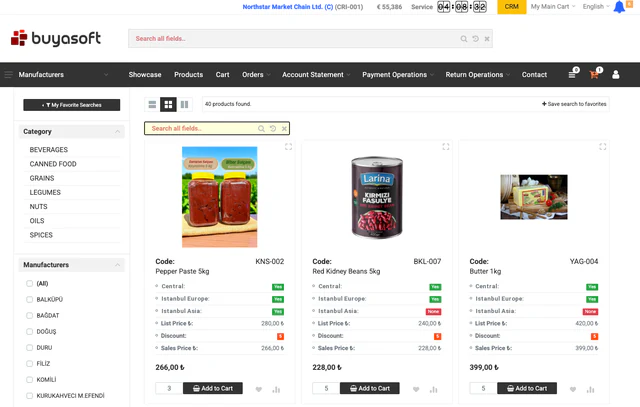
Order sent to your ERP ERP document number saved
20% + 10% + 5% discount Dealer-specific terms
Sound familiar?
Today
Orders arrive by phone, WhatsApp and email, and your team spends the day keying them in.
With Buyasoft B2B
Dealers place orders in the portal themselves; each order is checked and sent to your ERP.
Today
Every dealer’s prices, discounts and promotions are worked out by hand, and mistakes only show up after invoicing.
With Buyasoft B2B
Dealer prices, discounts and promotions are calculated in the cart and passed to your ERP exactly as shown.
Today
Orders from dealers who are over their credit limit or overdue ship before anyone notices.
With Buyasoft B2B
Credit, overdue balance and margin are checked when the order is placed; if needed, it goes for approval.
Today
The “What do I owe?” and “Where’s my order?” calls never stop.
With Buyasoft B2B
Dealers see their statement, invoices and order status in the portal, and pay their balance by card.
How it works
They see their own prices, warehouse stock, promotions and account balance.
By searching product codes or uploading from Excel; discounts and promotions apply instantly.
Credit limit, overdue balance, margin and order quotas are checked; if needed, the order goes for approval.
The ERP document number is saved with the order, and the dealer tracks its status in the portal.
Features
A sales channel that runs on your ERP data and applies your rules to every order.
Fast ordering
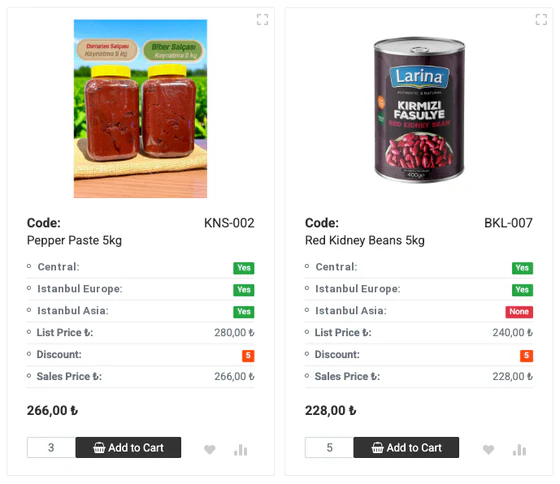
Each product card shows stock in every warehouse next to the dealer’s net price. Enter a quantity, add to cart, done.
Pricing & promotions
Your pricing and discount terms come from your ERP, and the portal applies them the same way in every cart.
Cart line · example
Sent to your ERP as three separate discounts.
Tiered promotion
Credit & approvals
Based on your rules, orders are either approved automatically or sent to the right manager. Your finance team only deals with the exceptions.
Order check
Awaiting approval Sales manager notified by email
Account & payments
No more calls about statements, invoices or payments: dealers see everything in the portal and pay there too.
Account summary
Sales team & insights
The portal doesn’t just take orders. It also shows what your dealers look for and who isn’t ordering.
Searches with no results · this month
Products dealers looked for but couldn’t find: your lost sales.
Price protection
In industries like spare parts, dealers buy from several wholesalers, and some apps automatically collect the prices on these portals and line them up side by side. Buyasoft B2B protects your prices from these apps.
Product list Dealer’s screen
No price found What the price-collecting app gets
Suspicious logins This week
Listed with the dealer, user, page and search term; exportable to Excel.
AI support assistant
MeerChat is the AI support assistant in the bottom-right corner of the panel you run the portal from. It answers your questions about B2B and CRM, knows which page you’re on and answers for that screen, so there’s no need to dig through manuals or call support.
E-Commerce Operations › Order Status Settings
I want orders from dealers over their credit limit to go for approval. How do I set that up?
Add a new rule on this page:
And more
Dealers start returns for undamaged or damaged goods in the portal and follow them there; returns are posted to your ERP.
Banners, product showcases, news and daily deals on the dealer’s home page.
Dealers earn points as they buy and spend them in the portal’s rewards store.
Use rules to decide which dealers see which products and warehouses.
Share catalogs, price lists and other documents with dealers in the portal.
Build dealer application, request and complaint forms without writing code.
The portal adapts to any screen, and you choose which fields show on phones.
Sell to dealers abroad with translated screens and exchange rates.
ERP integrations
The portal runs on your ERP data: no double entry, no manual transfers.
From ERP to portal
From portal to ERP
Some of the ERP and accounting systems we work with











ERP guides: Logo · Netsis · Mikro · SAP · Nebim · IFS · Canias · Uyumsoft · Akınsoft · ETA · DİA · Paraşüt · Bizim Hesap · Bilsoft
Your ERP isn’t on the list? As long as it allows access to its database or services, we can quickly connect to it too.
FAQ
Have another question? Call us: +90 216 277 70 80
We work with many systems, including Logo, Mikro, Netsis, SAP and Microsoft Dynamics 365. You’ll find the current list on our Integrations page; if your system isn’t there, talk to us.
Products, prices and stock are synced from your ERP at regular intervals that we set together based on your needs. Critical data such as credit limits is checked live in the ERP when an order is placed.
Yes. With price protection on, prices in the product list, showcases and cart appear on the page as images, and product searches made with automated tools are listed in the Suspicious Logins report. Your dealers see their prices as usual.
Yes. Reps log in with their own account, pick a dealer and order on their behalf. You set the maximum discount and minimum margin they can apply.
Yes. Dealers pay their balance by card through bank virtual POS or payment providers, and you can limit installment options. Payments are posted to your ERP.
Yes. The portal runs in the browser on phones, tablets and computers and adapts to every screen, so your dealers don’t need to download an app. You also choose which fields the product list shows on phones.
Both. Use Buyasoft in the cloud, or we’ll install it on your own servers.
Buyasoft B2B is installed separately for each customer, and your data is kept in your own database. When we host the system, it runs in a data center in Türkiye; when we install it on your own servers, the database is on your servers too. Under KVKK, Türkiye’s data protection law, you are the data controller for this data, and Buyasoft processes it only on your behalf and on your instructions, as a data processor.
Yes. During setup we connect the system to your ERP, set up your rules and permissions with you and train your team, and we stay close through the switch-over. After that, MeerChat, the AI support assistant in the panel, answers your questions; when you need more, you can open a support ticket from the same panel or reach us by phone or email.
MeerChat is an AI support assistant for the team members who use your management panel, and it answers questions about B2B and CRM. You decide who can use it through permissions.
Free demo
Tell us about your products, pricing and ERP, and we’ll prepare a demo tailored to you.