Today
Targets and commissions are worked out in Excel every month, and the numbers get disputed.
With Buyasoft CRM
Points and commissions are calculated by rule from sales and collections in your ERP, and every rep can see their own point history.

Your dealers order online, your sales team follows every customer on one screen and your warehouse runs without errors, all integrated with your ERP on one platform.
Request a free demo

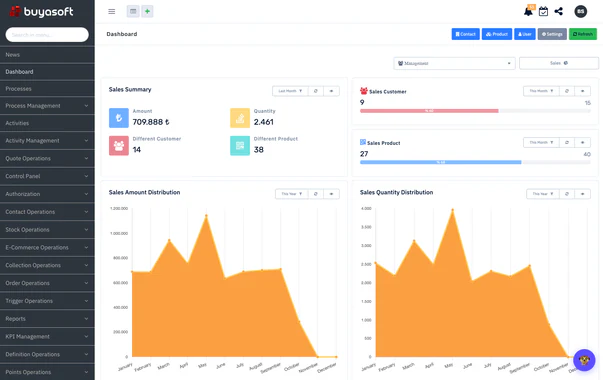
Every step is on record, from customer cards and quotes to visits and commissions. Quotes are approved by your rules, and targets and commissions are calculated from actual sales and collections in your ERP.
Quote approved Regional manager · approval step 2
MeerChat AI support assistant on every page
Sound familiar?
Today
Targets and commissions are worked out in Excel every month, and the numbers get disputed.
With Buyasoft CRM
Points and commissions are calculated by rule from sales and collections in your ERP, and every rep can see their own point history.
Today
Reps give discounts and send quotes without approval.
With Buyasoft CRM
Quotes with special prices or discounts go to a manager for approval, based on your rules.
Today
You only find out what happened in the field at the end of the month.
With Buyasoft CRM
Visits and calls are logged as activities, and you follow your team’s work in reports.
Today
Customer information is scattered across emails, notebooks and people’s heads.
With Buyasoft CRM
Contacts, addresses, invoices, open balance and documents, together on one customer card.
How it works
With account details, open invoices and history from your ERP.
Template-based, multi-currency quotes; every revision is kept as its own version.
Manager approval based on special prices, discounts or amount, in several steps if needed.
An accepted quote becomes an order in one click and goes to your ERP.
Sales and collections posted in your ERP count toward targets and points.
Features
A CRM that works with your ERP, enforces your rules and measures your team.
Customer card
Before a visit, your rep sees the customer’s balance, open invoices and history on one screen.
Open invoices
Quotes & approvals
Reps build quotes from templates. If a quote has special prices or discounts, it goes to a manager for approval based on your rules.
Quote QT-2026-0142 Revision 2
Grand total₺486,900.00
Convert to orderTargets & commissions
Targets and points are calculated from actual sales and collections in your ERP, so everyone knows where they stand.
October targets
Your points this month
980
Sales 640 · Collections 340
Activities & field sales
Visits, calls and meetings in one place, and managers follow the team’s work in reports.
Today’s activities
Process management
Design the form, set the steps and the teams responsible, and let the work move forward by your rules.
Dealer application
If time runs out, it escalates to the sales director.
Reporting
There are dozens of ready-made reports on sales, orders, collections and receivables. When you need a report specific to your business, we design it for you and add it to your dashboard.
Custom report Dashboard
Collections by region
AI support assistant
MeerChat is the AI support assistant in the bottom-right corner of every page of the panel. It answers your questions about CRM and B2B, knows which page you’re on and answers for that screen, so there’s no need to dig through manuals or call support.
Quote Operations › Approval Rules
If a rep gives a special discount on a quote, I want the sales manager to approve it. How do I set that up?
Add a new approval rule on this page:
And more
Let customers earn points on purchases and payments, and spend them in the B2B rewards store.
Employee leave requests, approvals and leave balances.
Store contracts and documents by type and link them to customers.
Data access follows your department tree, with custom permission rules where needed.
Automatic emails for approvals, escalations and status changes, with templates you can edit.
Screens and email templates in several languages.
The Buyasoft CRM app is on the App Store and Google Play.
Use Buyasoft CRM in the cloud, or we’ll install it on your own servers.
ERP integrations
Customer, invoice and sales data comes from your ERP, and orders and collections created in the CRM go back to it.
From ERP to CRM
From CRM to ERP
Some of the ERP and accounting systems we work with











ERP guides: Logo · Netsis · Mikro · SAP · Nebim · IFS · Canias · Uyumsoft · Akınsoft · ETA · DİA · Paraşüt · Bizim Hesap · Bilsoft
Your ERP isn’t on the list? As long as it allows access to its database or services, we can quickly connect to it too.
FAQ
Have another question? Call us: +90 216 277 70 80
Both. Use Buyasoft CRM in the cloud, or we’ll install it on your own servers.
Buyasoft CRM is installed separately for each customer, and your data is kept in your own database. When we host the system, it runs in a data center in Türkiye; when we install it on your own servers, the database is on your servers too. Under KVKK, Türkiye’s data protection law, you are the data controller for this data, and Buyasoft processes it only on your behalf and on your instructions, as a data processor.
Yes. Download the Buyasoft CRM app from the App Store or Google Play; the links are at the bottom of this page.
Sales and collection records are imported from your ERP. Your point rules, multipliers and percentage rules then calculate points by rep, team and customer, and every rep can see which record each point came from.
Yes. You set approval rules by special price, special discount, amount range or customer group. A quote that matches a rule isn’t finalized until it’s approved, and the approvers get an email. You can set up several approval steps and see each quote’s approval history.
Yes. Permissions follow your department tree, and you can add custom permission rules for cases that don’t fit it.
We work with more than 15 ERP and accounting systems, including Logo, Mikro, Netsis and SAP. The CRM doesn’t connect to your ERP directly: it works through an integration service set up for your ERP, and you decide which data comes over and how often. Orders and collections created in the CRM are posted to your ERP as well.
Yes. The B2B portal and the CRM share one platform: dealer orders, payments and searches from the portal show up in the CRM, and you manage the portal’s rules from the CRM too.
Yes. During setup we connect the system to your ERP, set up your rules and permissions with you and train your team, and we stay close through the switch-over. After that, MeerChat, the AI support assistant in the panel, answers your questions; when you need more, you can open a support ticket from the same panel or reach us by phone or email.
MeerChat is an AI support assistant for the team members who use your management panel, and it answers questions about B2B and CRM. You decide who can use it through permissions.
Free demo
Tell us how your team works today, and we’ll prepare a demo tailored to you.