Today
Only your longest-serving staff know which shelf an item is on.
With Buyasoft WMS
Every item has a location in the system. Receiving suggests where to put it away, and picking can’t go on until the right location is scanned.

Your dealers order online, your sales team follows every customer on one screen and your warehouse runs without errors, all integrated with your ERP on one platform.
Request a free demo

Orders come in from your ERP and work orders are created automatically by your rules. Your team receives, puts away, picks and checks with handheld scanners; every move is recorded by location, and documents and stock movements flow back to your ERP.
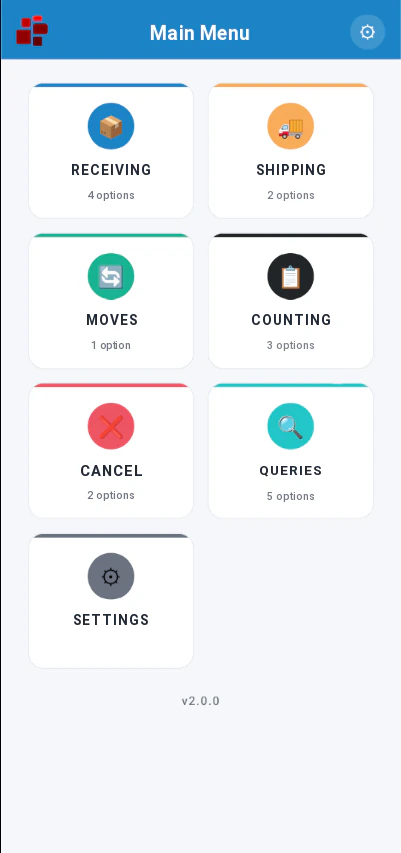
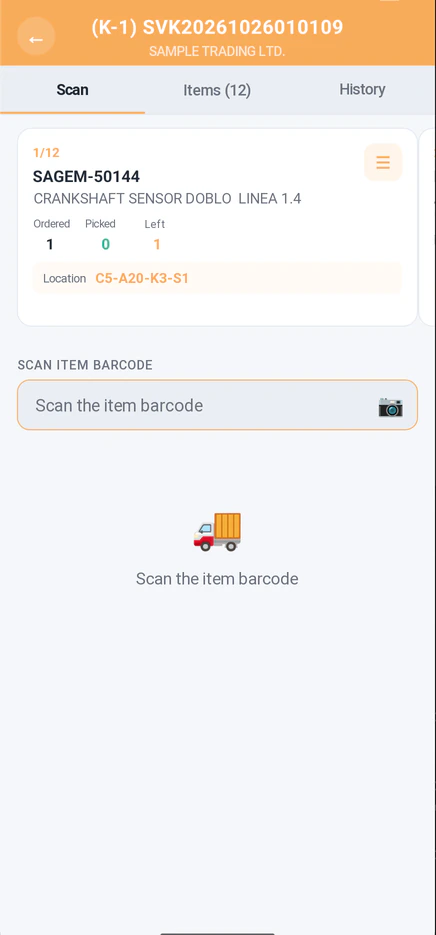
Barcode checks Wrong locations or items are flagged at once
Automatic work order Based on your shipping calendar and cut-off times
Sound familiar?
Today
Only your longest-serving staff know which shelf an item is on.
With Buyasoft WMS
Every item has a location in the system. Receiving suggests where to put it away, and picking can’t go on until the right location is scanned.
Today
Wrong items or short quantities only come to light when the customer calls.
With Buyasoft WMS
Every item is scanned at the shipment check, so mistakes are caught before the box is closed.
Today
Stock counts take days, and the results never match the ERP.
With Buyasoft WMS
Counts are done location by location with handheld scanners, with counted, WMS and ERP quantities side by side.
Today
Nobody knows where an order stands without calling the warehouse.
With Buyasoft WMS
The lane board and dashboard show who has each job and what stage it’s at.
How it works
Orders, products and incoming delivery notes are synced from your ERP at regular intervals.
Orders turn into work orders automatically, based on your shipping calendar and cut-off times.
A picker takes the work order on a handheld and scans every location and item.
Items are scanned again at the shipment check, boxed and labeled.
A delivery sheet or a carrier booking is prepared, and the shipping documents go to your ERP.
Features
A warehouse management system that works with your ERP and guides your team on handheld scanners.
Locations & layout
Set up your warehouse with storage areas and locations. Stock is kept by location and item, and every move is recorded with a scan.
Location code
A-03-02-1
Location type: picking · Fixed location for: Bearing 6204-2RS
Receiving & put-away
Purchase, return and transfer delivery notes from your ERP become receiving work orders, and your team receives the goods by scanning them.
Receiving MK20261027010007
Put-away suggestion A-03-02-1 · fixed location
Picking & lanes
Automatic work order rules group orders by your shipping calendar, and pickers work from a single list sorted by location.
Lane board
DomesticExportTransfer
Priority jobs blink on the board.
Shipment check & packing
Every item is scanned at the shipment check, and boxes, weights and labels are handled on the same screen.
Stock counts
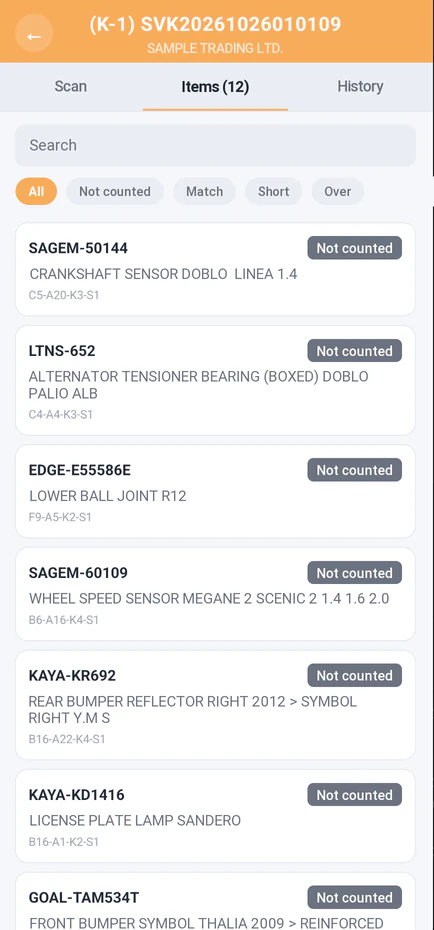
Count the whole warehouse, one storage area or random locations, scanning every location with a handheld.
Check count · Storage area B
Recounts go only to locations that came out short or over.
Transfers, replenishment & kits
Transfers between your warehouses or storage areas go through the same picking and receiving flow.
Replenishment · Branch warehouse
Dashboard
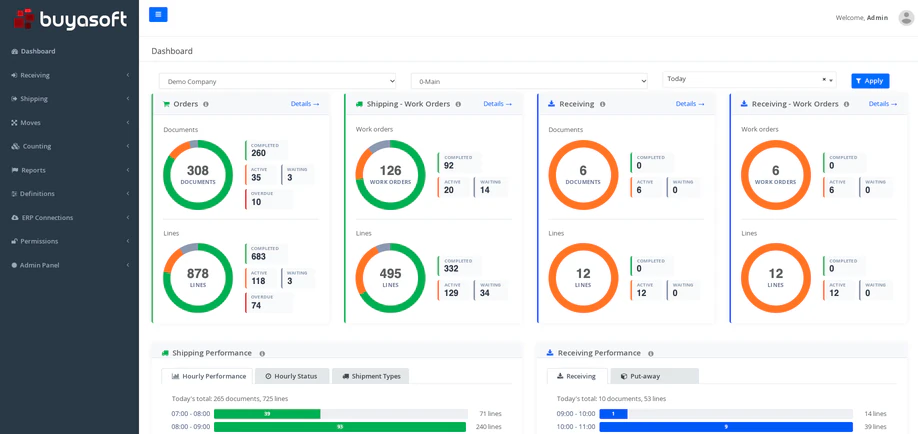
Orders, shipping and receiving work orders, and hourly performance, filtered by company, warehouse and date.
And more
Receiving, put-away, picking, shipment checks, counts and moves, all done by scanning on a handheld.
Location, item, box and shipping labels print automatically on your warehouse label printers.
Pending and overdue work, hourly and daily performance, and status by shipment type.
Who received, put away, picked and checked how much, in one report.
Stock by location, slow-moving stock, WMS vs. ERP stock and cancellation reasons, all exportable to Excel.
Each company has its own ERP connection and document settings, and users can be limited to their own warehouse.
Role-based permissions, including handheld rights, and a log of logins, changes, imports and exports.
Turkish, English and German; every user picks their own language.
ERP integrations
Orders and documents come from your ERP, and every move in the warehouse flows back to it.
From ERP to WMS
From WMS to ERP
ERP guides: Logo · Netsis · Mikro · SAP · Nebim · IFS · Canias · Uyumsoft · Akınsoft · ETA · DİA
Your ERP isn’t on the list? As long as it allows access to its database or services, we can quickly connect to it too.
FAQ
Have another question? Call us: +90 216 277 70 80
Warehouse work is done by scanning barcodes in the handheld app. Some tasks, such as shipment checks and bulk receiving and put-away, can also be done on web screens.
The Buyasoft WMS handheld app runs on Android devices, and product and location barcodes are read with the device’s scanner. You can also look up in the app where a product is stored or what a location holds.
Orders, products and incoming delivery notes arrive from your ERP through scheduled syncs. Documents for shipped orders and stock movements are sent back to your ERP.
Yes. Warehouses, storage areas and locations are set up separately, and transfers between warehouses run on transfer plans. Several companies can work in the same system too.
We set the label size and template for each document type per warehouse. Print jobs go to your label and network printers through a print service running in your warehouse.
Yes. You link a shipment type to a carrier: the shipment details created at packing (recipient, number of packages, volumetric weight) go to the carrier on their own, and with supported carriers the shipping label prints in your warehouse. Integrations with Aras Kargo, Yurtiçi Kargo, DHL eCommerce (MNG Kargo), City Logistics and Pargo are ready; shipments that fail to go through show up in a report and are sent again.
Yes. The e-invoice or e-archive invoice and the e-dispatch note of a shipped order are issued from the WMS through a certified e-document provider, with the carrier, driver and plate on the e-dispatch note taken from the shipment type. Invoices print on A4 or 80/100 mm thermal printers with the Revenue Administration (GİB) QR code.
You plan a full, storage-area or random-location count and assign counters to location ranges. First, check and supervisor counts settle the differences, and the approved result updates location stock.
You upload your location list from Excel and print the location labels in bulk, while products, barcodes and orders come in from your ERP. Then, with an initial count plan, your team scans every location with a handheld; counted quantities appear next to your ERP quantities, and once you approve them, your location stock is in place.
Both. Use Buyasoft WMS in the cloud, or we’ll install it on your own servers. Either way, labels go to your printers through the print service running in your warehouse.
Buyasoft WMS is installed separately for each customer, and your data is kept in your own database. When we host the system, it runs in a data center in Türkiye; when we install it on your own servers, the database is on your servers too. Under KVKK, Türkiye’s data protection law, you are the data controller for this data, and Buyasoft processes it only on your behalf and on your instructions, as a data processor.
Yes. During setup we connect the system to your ERP, set up your rules and permissions with you and train your team, and we stay close through the switch-over. After that, our support team is just a phone call or an email away.
Free demo
Tell us about your warehouse layout, order volume and ERP, and we’ll prepare a demo tailored to you.