


As a warehouse grows, the same question comes up: “Our ERP already has a stock module, so why would we need a WMS as well?” In short, your ERP knows how much stock you have; a WMS knows where it is, who handled it and whether it went into the right box. Below, we explain the difference in detail and how the two systems work together.
What does an ERP do, and what does a WMS do?
ERP: your company’s system of record
ERP (enterprise resource planning) is the company’s shared system of record: customer accounts, invoices, orders, product cards, prices and accounting entries all live there. For stock, the ERP answers one question: how much of each product is in each warehouse, and which documents brought it in or took it out?
WMS: the system that runs your warehouse
A WMS (warehouse management system) runs the work inside the warehouse. Every item has a location, and receiving, put-away, picking, shipment checks and stock counts are done by scanning barcodes on handhelds. Its question is different: exactly where is this item, who picks it in what order, and did the right item go into the right box?
Where do ERP and WMS overlap?
Both systems know your products, stock and orders, so the two terms sometimes get used interchangeably. The difference is the level of detail:
| Task | ERP stock module | WMS |
|---|---|---|
| The question it answers | How much do we have? | Where is it, who has it and what stage is it at? |
| Stock | Total quantity per warehouse | Quantity per location: aisle, rack, level, bin |
| Receiving | Recording the purchase delivery note | Receiving by barcode, flagging short and over deliveries, put-away suggestions |
| Order fulfillment | The order and its shipping document | Work orders, pick lists sorted by location, barcode shipment checks |
| Stock counts | Entering the count results | Location-by-location counts, with counted, WMS and ERP quantities side by side |
| Team | Who recorded the document | Who received, picked and checked what |
Some ERPs also let you define shelves or locations. But guiding warehouse work step by step, verifying each step with a scan and tracking the team’s work is what a WMS is for.
Why an ERP stock module isn’t a WMS
Location management: where exactly is the stock?
Your ERP tells you how many bearings are in the main warehouse, but usually not which shelf they’re on. In a WMS, every item has a location and stock is kept by location. Receiving suggests where to put goods away and every move is recorded with a scan, so finding an item no longer depends on a few people’s memory.
Picking: who picks what, and in what order?
An order in the ERP doesn’t say who should pick it, or in what order. In a WMS, orders become work orders based on your shipping calendar and cut-off times; several orders can share one work order, and the picker works from a single list sorted by location. The picker can’t move on until the right location is scanned and it holds enough stock.
Barcode-verified shipment checks
Wrong items and short quantities often surface only when the customer calls. In a WMS, every item is scanned at the shipment check, so mistakes are caught before the box is closed, and boxes, weights and labels are handled on the same screen.
Stock counts: location by location, on a handheld
With an ERP, a count usually means working through lists by hand and keying in the results. In a WMS, you count location by location on a handheld; the counter never sees the expected quantity and is only told whether the result matches, is short or is over. Only locations that came out different are recounted, and counted, WMS and ERP quantities appear side by side.
How do ERP and WMS work together?
The two systems complement each other rather than compete. The division of labor is clear: the ERP remains the source of products, customers and orders, while the WMS runs the warehouse and reports its results back to the ERP. A typical flow:
- An order is created in the ERP or transferred to it from the dealer portal.
- Orders, products and incoming delivery notes are synced to the WMS at regular intervals.
- The WMS turns orders into work orders by your rules; the team picks, checks and packs.
- Documents for shipped orders, warehouse and transfer postings, and backorders go back to the ERP.
Accounting and sales keep working from the ERP’s records, the warehouse runs on its own system, and nothing is entered twice.
Signs you need a WMS
- Only your experienced staff know which shelf an item is on.
- Wrong items or short shipments are only noticed when the customer complains.
- Stock counts take days, and the results don’t match your ERP.
- Finding out where an order stands means calling the warehouse.
- Transfers between warehouses or branches are tracked on paper.
- As your product range and order volume grow, so do warehouse mistakes.
What these signs have in common: the problem isn’t your ERP. It’s that work the ERP was never designed for is being done by hand.
WMS or ERP: which do you need, and when?
The short answer: an ERP is the foundation for every company; a WMS comes in when the warehouse starts to become the bottleneck.
You need an ERP for customer accounts, invoicing and accounting regardless. With a single small warehouse and a limited product range, its stock module may be enough. But as your range, order volume, number of warehouses or warehouse team grows, managing locations, picking, checks and counts by hand gets harder, and that’s exactly when it’s time for a WMS.
How does Buyasoft WMS connect to your ERP?
Buyasoft WMS is a warehouse management system that works alongside your ERP. Orders and documents arrive from your ERP through scheduled syncs, and every move in the warehouse flows back to it.
From ERP to WMS
- Orders and customers
- Products, barcodes and dimensional weights
- Purchase, return and transfer delivery notes
- Kit contents
From WMS to ERP
- Documents for shipped orders
- Warehouse and transfer postings
- Backorders for quantities not shipped
Your team handles receiving, put-away, picking, shipment checks, counts and transfers by barcode on handhelds, while the lane board and dashboard show who has each job and what stage it’s at. For ERP-specific details, see our Logo, Netsis, Mikro, SAP and other integration pages; if your ERP isn’t listed, we can still connect to it as long as it allows access to its database or services.
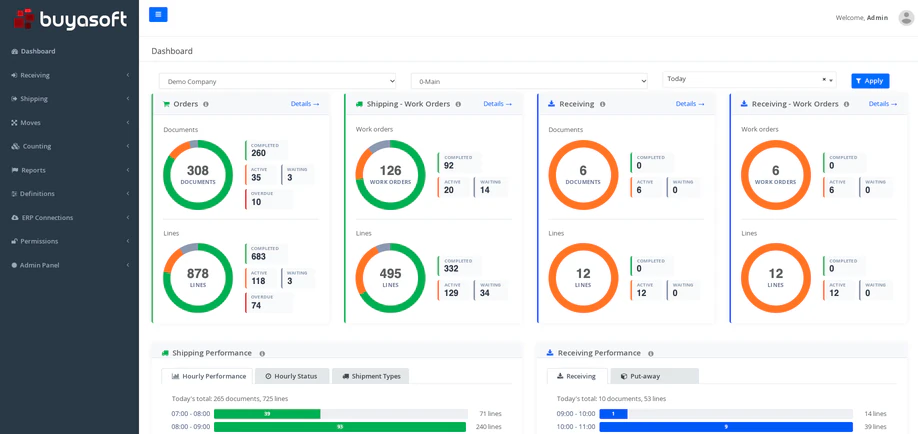
If you take dealer orders with Buyasoft B2B, those orders also reach the warehouse through your ERP, and your sales team works on the same platform with Buyasoft CRM.
Frequently asked questions
Does a WMS replace your ERP?
No. A WMS runs the warehouse; customer accounts, invoices and accounting stay in the ERP. The two work together, and you don’t have to replace your ERP to adopt a WMS.
Do you need handheld scanners for a WMS?
Warehouse work is done by scanning barcodes in the handheld app. In Buyasoft WMS, some tasks, such as shipment checks and bulk receiving and put-away, can also be done on web screens.
Can we manage several warehouses in one system?
Yes. Warehouses, storage areas and locations are set up separately, and transfers between warehouses run on transfer plans. Several companies can work in the same system too.
In short: your ERP knows how much stock you have; a WMS manages where it is and how it moves. When the two work together, the warehouse and accounting look at the same records.
If you see a few of these signs in your warehouse, let’s talk about where to start, and we’ll prepare a demo tailored to your warehouse setup and your ERP.
Request a free demoor call us at +90 216 277 70 80.