


For many distributors that sell through dealers, every day looks the same: orders arrive by phone, WhatsApp and email, the sales team keys them into the ERP one by one, and each dealer’s prices and discounts are worked out by hand. As the business grows, this gets slower and more error-prone. A dealer portal lightens the load: dealers place their own orders, and your rules do the checking.
What is a dealer portal?
A dealer portal (also called a B2B portal or B2B eCommerce portal) is an online ordering system that a manufacturer, distributor or wholesaler opens only to its own dealers and sales team. Unlike a public eCommerce site, every dealer logs in with their own account and sees only what applies to them: their prices and discounts, the products and warehouses open to them, their account balance and any overdue amount.
A good dealer portal isn’t a separate system; it runs on the data in your ERP. Products, prices, stock and account details come from the ERP, and portal orders flow back into it. Nothing is kept in two places, so there’s no double entry and no manual re-keying.
| Aspect | Online store (B2C) | Dealer portal (B2B) |
|---|---|---|
| Who uses it? | Anyone who visits the site | Your registered dealers and sales team |
| Pricing | The same price for everyone | Prices and discounts by dealer, dealer group and product group |
| Orders | Carts with a few items | Multi-line, repeat orders; search by code, bulk upload from Excel |
| Payment | At checkout | On account with payment terms, or by card |
| Checks | Payment approval | Credit limit, overdue balance and approval rules |
Who needs a dealer portal?
Any company that makes a large share of its sales through dealers, wholesalers or business customers who buy regularly can benefit from a dealer portal, especially:
- Distributors and wholesalers with a wide product range
- Manufacturers that sell through a dealer network
- Industries where products are searched for by code, such as automotive spare parts
- Companies that give each dealer different prices, discounts and payment terms
If a few of these sound familiar, it’s time for a dealer portal:
- Orders come in by phone, WhatsApp and email, and your team spends all day keying them in.
- Prices and discounts are worked out by hand, and mistakes only surface after invoicing.
- Orders from dealers over their credit limit ship before anyone notices.
- The “What do I owe?” and “Where’s my order?” calls never stop.
What does a dealer portal change?
For your dealers
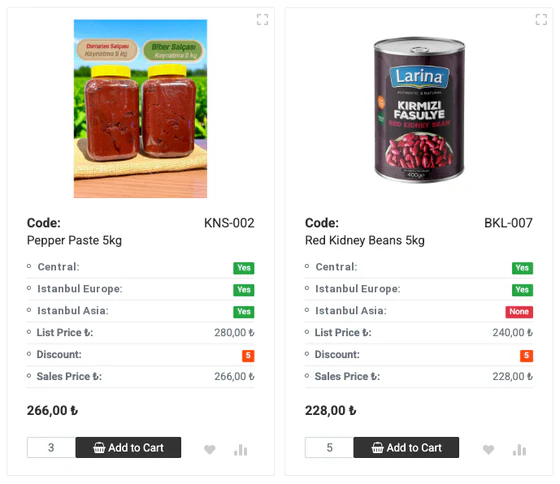
Dealers order whenever they like, not just during business hours. They search by product code or bulk-upload a cart from Excel, and see their net price and stock by warehouse next to every product. They follow their account statement, invoices and order status in the portal, pay their balance by card if they wish, and start and track returns of undamaged or damaged goods.
For your sales team
Sales reps focus on selling instead of taking orders over the phone. In sales rep mode, a rep picks a dealer and orders on their behalf, within discount and margin limits you set. Reports on searches with no results, items removed from carts and dealers who search but don’t order reveal lost sales and the dealers to call.
For finance and management
Every order is checked against the same rules: remaining credit limit, overdue balance and margin. Orders that meet your rules are approved automatically, and the rest go to the right manager for approval. Your finance team only deals with the exceptions, and card payments are posted to the ERP too.
What to look for when choosing a dealer portal
At first glance, dealer portals all look alike: a product list, a cart, an order. The differences are in the details. When you see a demo, be sure to ask about these five areas.
ERP integration
The portal should take prices, stock and account data from your ERP and write each order back to it, discounts included. Questions to ask:
- How often are products, prices and stock updated, and can you set the interval yourself?
- Is critical data such as the credit limit checked in the ERP at the moment of ordering?
- Is the document number the ERP assigns written back to the order?
- What happens if a transfer fails? Can the order be sent again?
Dealer-specific prices, discounts and promotions
The portal should handle prices by dealer, dealer group and product group, stacked discounts such as 20% + 10% + 5%, tiered promotions, and discounts or surcharges by payment method. What matters is that these terms are applied with the same rules in every cart and that the order reaches your ERP exactly as placed. Rules should also let you decide which dealers see which products and warehouses.
Credit limits and approval rules
The remaining credit limit and overdue balance should be checked when the order is placed, counting orders that haven’t reached the ERP yet. Your own rules should decide when an order is held, who sends it for approval and who approves it.
Online payments
Letting dealers pay their balance or orders by card in the portal speeds up collections. Look for a setup that works with banks’ virtual POS and payment providers, uses 3D Secure, calculates installments and interest by your rules and posts payments to your ERP. You’ll find the details on our B2B online payments page.
Phone and tablet use
Dealers don’t always order from a desk; they should be able to order from their phones in the shop, the warehouse or on the road. A portal that adapts to any screen and shows only the fields that matter on a phone has a direct effect on how much it gets used.
How Buyasoft B2B works
Buyasoft B2B is a dealer portal where your dealers order using the data in your ERP. Getting from the dealer’s cart to your ERP takes four steps:
- The dealer logs in. They see their own prices, warehouse stock, promotions and account balance.
- They build a cart. They search by product code or bulk-upload from Excel; discounts and promotions are calculated instantly.
- Your rules kick in. Credit limit, overdue balance, margin and order quotas are checked; if needed, the order goes for approval.
- The order goes to your ERP. The document number from the ERP is saved with the order, and the dealer tracks its status in the portal.
Buyasoft B2B works two-way with Logo, Netsis, Mikro, SAP and many other ERPs. You’ll find the full list on our Integrations page.
The portal shares a platform with Buyasoft CRM: the orders, payments and searches dealers make in the portal show up in the CRM, and you manage the portal’s rules there. For picking and checking orders by barcode in the warehouse, Buyasoft WMS works with the same ERP.
Whenever the team running the portal gets stuck, they can ask MeerChat, the AI support assistant in the bottom-right corner of the panel.
Frequently asked questions
Is a dealer portal the same as B2B eCommerce?
The two terms are often used interchangeably. B2B eCommerce is the umbrella term for online selling between businesses; a dealer portal is the form of it that’s open only to your dealers, where each dealer orders on their own terms.
Does a dealer portal replace the ERP?
No, it works alongside your ERP. Products, prices, stock and account details come from the ERP, and orders, return requests and card payments go back to it. Your invoicing and accounting stay in the ERP.
Does Buyasoft B2B run in the cloud or on our own servers?
Both are possible: use Buyasoft in the cloud, or we’ll install it on your own servers.
In short: A dealer portal is a sales channel that leaves the ordering to your dealers and the checking to your rules. When it works properly with your ERP, your sales team sells instead of keying in orders, and your finance team only deals with the exceptions.
Let’s talk about how your dealers order today, your pricing and discount structure and your ERP, and we’ll prepare a demo tailored to you.
Request a free demoor call us on +90 216 277 70 80.